Notifications
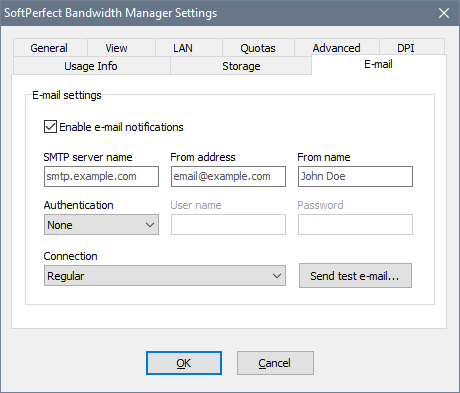
Bandwidth Manager can send out e-mail notifications to users controlled by its quotas. The notifications are sent automatically when a specific event occurs, for example when a user has used up their quota. Before you setup notifications, you should enable this feature in the global settings and fill the appropriate parameters for sending mail:
Once the notifications have been enabled, you can proceed and define a new notification via Tools - Notifications in the main menu. There are the following types of notifications that can be configured:
- Transfer rate limit changed sends an e-mail whenever a transfer rate assigned to the rule changes as a result of gradual quota usage. This notification can be assigned to a rule linked with a smooth quota, i.e. a quota whose data transfer rate changes gradually as it is consumed. For example, if a user has a quota of 100 MB and the user’s rule is assigned this notification, the user will be sent several e-mails as the quota is being consumed, an e-mail message for approximately every 10 MB consumed.
- Quota exceeded sends an e-mail when the rule has used up an assigned quota. This notification can be set for any rule with a quota.
- Quota reset sends an e-mail when a quota assigned to the rule has been reset. Likewise, this notification can be set for any rule with a quota.
- Quota boost added sends an e-mail when a quota boost is added. This notification can be set for any rule with a “boosted” quota.
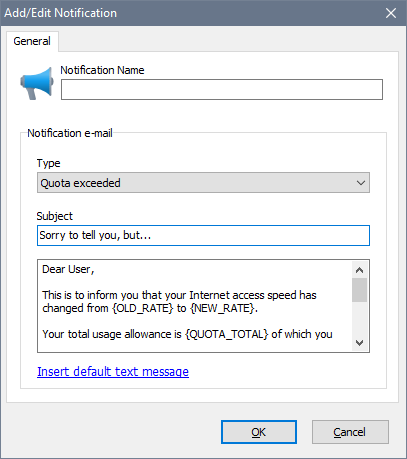
You can use the following tags in the e-mail templates:
| Tag | Description |
|---|---|
| Tags that can be used with the Transfer rate limit changed, Quota exceeded and Quota reset notification types: | |
| {OLD_RATE} | Old transfer rate that was in effect before. |
| {NEW_RATE} | New transfer rate assigned to the rule. |
| {QUOTA_TOTAL} | Quota allowance. |
| {QUOTA_USED} | Used amount of the quota. |
| {QUOTA_LEFT} | Remaining amount of the quota. |
| {RULE_NAME} | The associated rule’s name. |
| {STREAM_ADDR} | User’s IP or MAC address when rule tracking is used. |
| {WEBINFO_HOST} | The name of the server the software is running on. |
| {WEBINFO_PATH} | Path to usage web-report. This makes a clickable URL in the e-mail which lets the users see their usage stats. This tag must follow the server name, e.g. http://{WEBINFO_HOST}/{WEBINFO_PATH} as in the provided default message. |
| Tag that can be used with the Quota boost added notification type: | |
| {QUOTA_BOOST} | The amount added to the quota in a quota boost. |
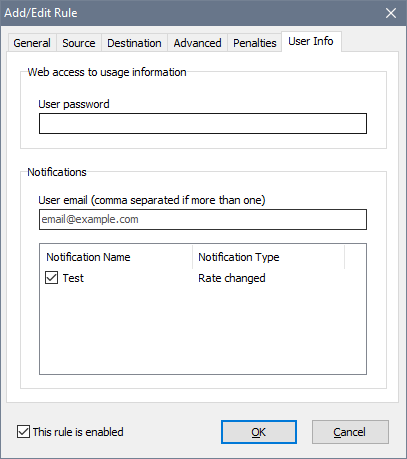
Once a notification has been created, you need to add a quota.
Finally, you need to link a rule with both the quota and notification, and also specify the user’s e-mail address that the notifications should be sent to. A rule can have multiple notifications assigned.